Vercodax
Frame Set
Frame Set
Couldn't load pickup availability
Self-paced learning overview
- 💻 Digital course file available after purchase
- 📚 Learning materials available for long-term use
- 🔒 Secure checkout
- 🧩 Content updated in 2026
1. Problem Statement
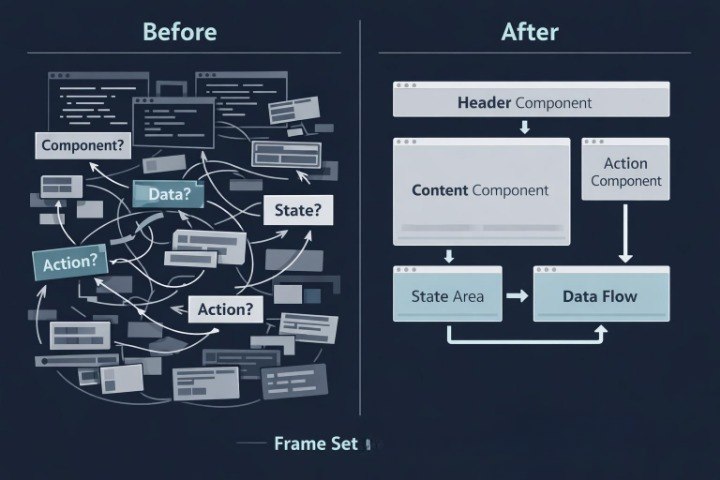
Struggling to move from separate React examples to a more organized interface structure? You're not alone. After a first look at React programming, many students understand separate topics but find it difficult to bring them into one connected learning structure. Components may look clear on their own, but when combined with props, state, and events, confusion can appear. Students often do not know where to place data, how to divide the interface into parts, or how to keep the code organized. Frame Set was created to help students study the interface frame more carefully and understand the role of each part in a learning example.
2. Solution
This course will teach you how to organize React interface parts into a clearer learning structure. Frame Set explains how components form the base of an interface, how props pass data between parts, and how state helps display changes. The course is built around small learning scenarios where each topic has a practical use. Students gradually move from reading one component to building several connected parts. The materials are presented at a calm pace, without exaggerated claims or marketing pressure.
3. What’s Inside
- Module 1: Interface Frame — students learn how an interface can be divided into understandable parts, why this structure helps with reading code, and how to define the role of each block.
- Module 2: Component Grouping — this module explains how to group components by purpose, how to avoid chaotic division, and how to build a simple component scheme.
- Module 3: Props in Context — students review how props work not separately, but within several connected components that pass and display data.
- Module 4: State Placement — this module helps students understand where state can be kept in a learning example and how its placement affects interface behavior.
- Module 5: Event Flow — students study how a user action moves through interface logic, starts a state change, and updates what is displayed.
- Module 6: Small Layout Practice — a practice block where students create a small learning interface with several components, props, state, and events.
- Module 7: Structure Review — a summary module for review: how to read the interface frame, see connections between parts, and check the logic of a small learning project.
4. Who is this for?
✅ Fits you if you...
- have already reviewed the basic ideas of React programming;
- want to better understand interface structure;
- want to learn how to combine several components in a learning example;
- need practice with props, state, and events;
- value organized presentation without loud claims.
❌ Not for you if...
- you are not yet familiar with basic component ideas;
- you need broad architecture topics for large projects;
- you are looking for learning with financial or career-related claims;
- you need a large collection of separate tasks;
- you want to move directly into complex scenarios without reviewing the basics.
5. What You’ll Learn
- how to build a simple interface frame;
- how to group components by meaning and role;
- how to pass data between connected parts;
- how to define where state belongs in a learning example;
- how events affect interface changes;
- how to combine components, props, state, and events;
- how to read the logic of a small interface block;
- how to check whether the structure of a learning example remains clear.
6. Return Terms
Frame Set includes a 30-day return policy according to Vercodax store terms. If the materials do not match the student’s expectations, they can contact the support team within this period. The request is reviewed according to store rules, purchase date, and material usage terms.
1. Who are Vercodax plans created for?
1. Who are Vercodax plans created for?
Vercodax plans are created for students who want to study React programming through structured courses, practical materials, and organized modules. Each plan has its own topic depth, examples, and learning tasks.
2. Can I start without much development experience?
2. Can I start without much development experience?
Yes, some plans are suitable for an introductory learning path. The materials are organized so students can gradually move from basic concepts to more detailed learning scenarios.
3. What is included in Vercodax courses?
3. What is included in Vercodax courses?
The courses include lessons, modules, interface structure examples, self-study tasks, component logic explanations, review materials, and topic-based practice blocks.
4. Can I choose a plan for my own learning pace?
4. Can I choose a plan for my own learning pace?
Yes, the plans differ by content volume and topic depth. A student can choose the format that fits their learning rhythm, current knowledge level, and preferred material scope.
Share